Claims Management
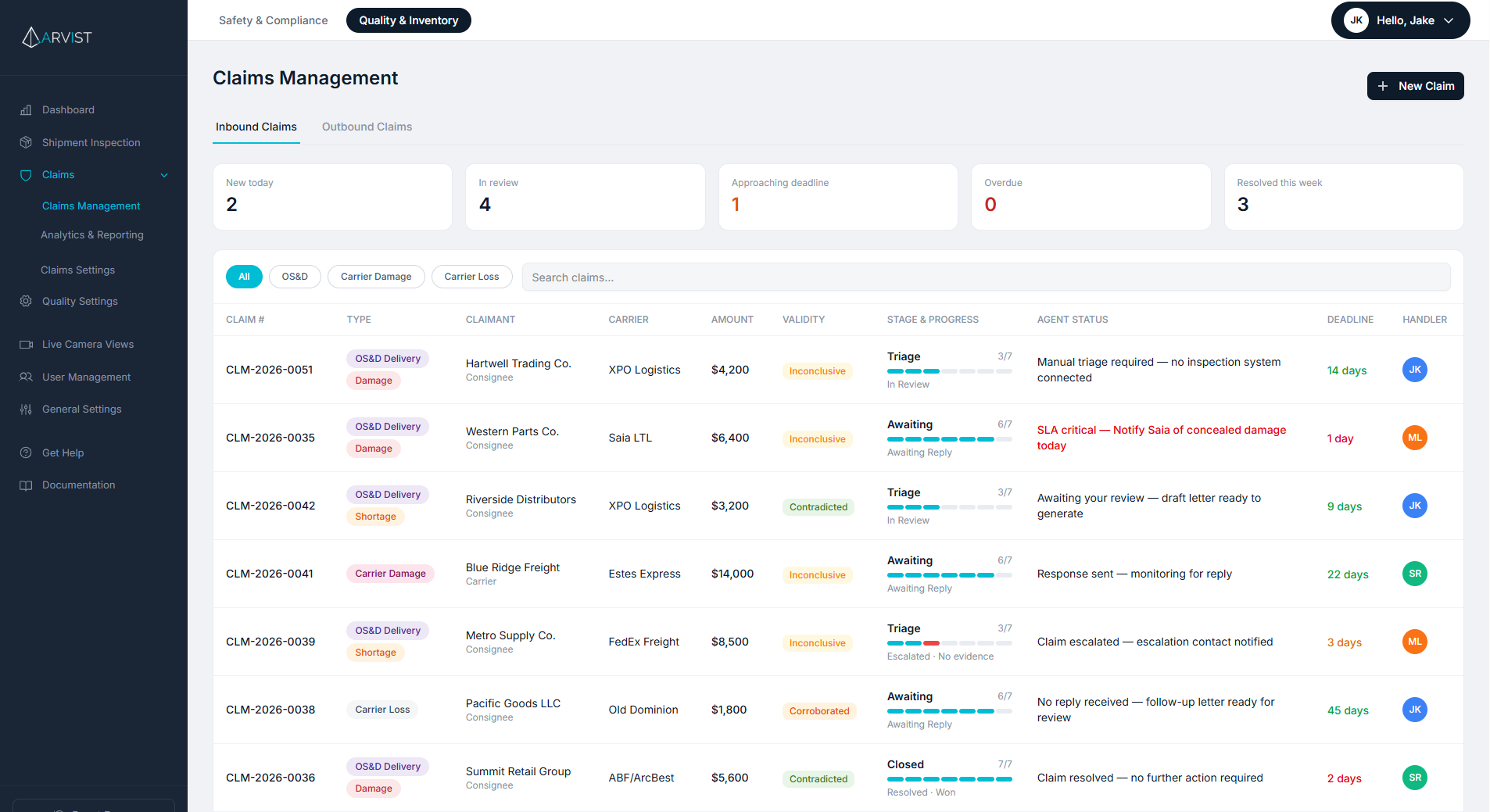
Claims Management is a module within the Arvist platform that helps operational teams handle freight claims end-to-end — from the moment a claim arrives through to resolution. It brings together Arvist's inspection evidence, AI-assisted drafting, deadline enforcement, and a full communication record in one place, eliminating the need to hunt across email, WMS, and ERP systems to manage a claim.
The module covers claims in both directions:
- Claims Received — a consignee or carrier files a claim against your organization, and your team needs to respond, contest, or resolve it.
- Claims Filed — your team files a claim against a carrier to recover losses, backed by your inspection evidence. See Claims Filed for the full walkthrough.
How It Works
Every claim in Arvist is grounded in your inspection records. When a claim arrives, the platform automatically retrieves the Arvist inspection data for the shipment in question — count results, damage detection outcomes, load verification photos, and timestamps — and surfaces it alongside the claim details. Your team sees the full picture immediately, without any manual document hunting.
From there, an AI agent assesses the claim against the inspection evidence, scores the risk, and drafts a response letter for handler review. Nothing is sent without human approval — letters are sent from the handler's own email client, pre-populated by the platform. The agent also monitors open claims for approaching deadlines, drafts follow-up letters when counterparties go quiet, and escalates when SLA windows are at risk.
Every action, communication, and agent event is logged in a timestamped timeline against the claim record — creating a complete, auditable history.
What Claims Management Handles
Claims Received — claims filed against your organization by consignees or carriers:
| Claim Type | Filed By | Typical Trigger |
|---|---|---|
| OS&D — Shortage | Consignee | Fewer units received than on the BOL |
| OS&D — Damage | Consignee | Goods arrived damaged |
| OS&D — Overage | Consignee | More units received than ordered |
| OS&D — Shortage & Damage | Consignee | Combined discrepancy |
| Carrier Damage | Carrier or consignee | Transit damage — carrier pushes liability back |
| Carrier Loss | Carrier or consignee | Shipment lost in transit |
| Concealed Damage | Consignee | Damage discovered after delivery — carries a tight deadline |
Claims Filed — claims your team files against a carrier:
| Claim Type | Filed Against | Typical Trigger |
|---|---|---|
| Carrier Claim — Damage | Carrier | Transit damage to your freight — recover from carrier |
| Carrier Claim — Loss | Carrier | Shipment lost in transit — recover the shipment value |
Carrier claims can be created directly from the Claims Filed tab, or initiated from within a received claim using the File Against Carrier action when the inspection evidence contradicts the consignee's claim. See Claims Filed.
The Role of Inspection Evidence
Arvist's inspection records are the foundation of every claim response. A single shipment may have multiple inspection records, each covering a different stage of the outbound process:
- Count inspection — verifies correct quantity was packed before pallets were wrapped
- Damage inspection — AI-based damage detection confirming goods were undamaged at departure
- Load verification — confirms the correct load was tendered to the carrier at the dock door
Together, these create a chain of custody that documents the condition and count of every shipment as it left your facility. When a consignee claims goods arrived short or damaged, your Arvist inspection record is the evidence that places responsibility where it belongs.
When all three inspection types are present, the evidence chain is marked Complete. Partial or missing inspection records are flagged so handlers know where the evidence gaps are before drafting a response.
Key Capabilities
Claim intake — create claims manually, upload claim documents for automatic field extraction, or paste email content for parsing. The platform extracts claim type, claimant details, shipment identifiers, and claimed amount automatically.
Inspection evidence lookup — as soon as a claim is created, the platform queries the Arvist inspection database and surfaces all matched records alongside the claim. No manual search required.
AI triage — the agent assesses every claim on arrival, producing a validity signal (Contradicted / Corroborated / Inconclusive), a risk score, and a suggested disposition to guide the handler's next action.
Response drafting — the agent generates carrier-specific dispute letters, RFIs, acceptance letters, and outbound demand letters grounded in the inspection evidence. Handlers review every draft, then send it from their own email client with the recipient, subject, body, and evidence attachment links pre-filled.
Deadline enforcement — all response windows are tracked automatically. The platform alerts handlers at 7, 3, and 1 day before deadlines, and escalates automatically on breach. Concealed damage deadlines (5 business days, or 48 hours for Saia) are tracked separately given their urgency.
Follow-up management — if a counterparty goes quiet, the agent drafts a follow-up letter automatically after a configurable window (default: 10 business days) and surfaces it for handler approval.
Full audit trail — every status change, agent action, and communication is logged chronologically in the claim timeline with timestamp and actor.
Analytics & Reporting — aggregate visibility across your claim portfolio: defense rates, financial exposure, SLA compliance, consignee patterns, and carrier damage trends.
Navigation
Claims Management is accessible from the main sidebar under Quality & Inventory > Claims. The section contains three pages:
- Claims Management — the active claims queue, with Claims Received and Claims Filed tabs, and individual claim workspaces
- Analytics & Reporting — aggregate reporting across all claims
- Claims Settings — configuration for your organization's claims preferences
Requirements
Claims Management works best when Arvist's Shipment Inspection module is active and inspections are being performed on outbound shipments. Inspection records are matched to claims automatically using shipment identifiers (Shipment ID, BOL number, Order/PO number).
If your organization has not yet deployed Arvist's inspection solution, Claims Management can operate in Standalone mode — the full claims workflow remains available, but evidence must be uploaded manually and triage is completed by the handler rather than automatically. See Claims Settings for configuration details.